Landed somewhere new
Three days in Lisbon, forty saves from months of scrolling. Magpie already has them mapped — sorted by what’s near your hotel.
Saves pile up in a folder you’ll never open again. Hand them to magpie instead — it reads each post, finds the real place, and builds you a nest of cafés, bars and hidden beaches worth going to. You just show up.
Saves, scattered everywhere
Two apps, two buried piles of “one day”.
Magpie picks the shiny bits
On-device AI plucks the place out of every save.
One list, ready to go
One master list that moves with you.
And you, actually there
The finding’s done. All that’s left is the enjoying.
Three days in Lisbon, forty saves from months of scrolling. Magpie already has them mapped — sorted by what’s near your hotel.
Someone always asks. Now you’re the friend with the list — your best finds, shared in a tap instead of “I’ll try to find it”.
No trip required. A free Tuesday morning plus that laneway café you saved in March — finally, together at last.
Too many saves, zero decisions. One tap and magpie lands on a spot that’s actually walkable right now. See where it leads.
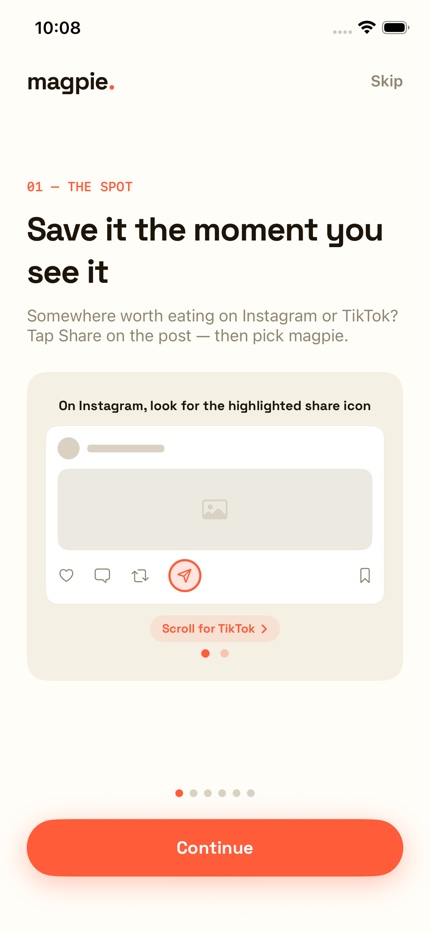
See somewhere worth eating on Instagram or TikTok? Don't screenshot it, and don't bury it in a saved folder you'll never dig through again. Hit Share and pick magpie — the tutorial shows you exactly where that button hides in each app.
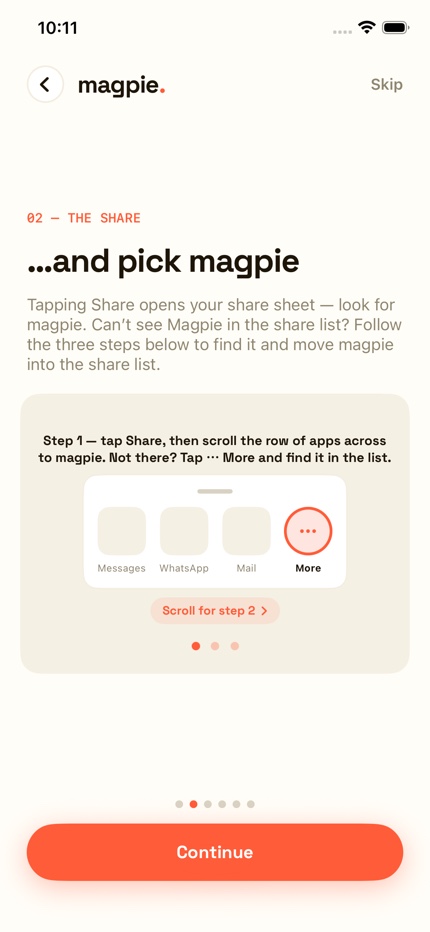
Can't see magpie in the share list? Tap ⋯ More, choose Edit, then tap the + beside magpie. That moves it up the list so it's easier to find next time.
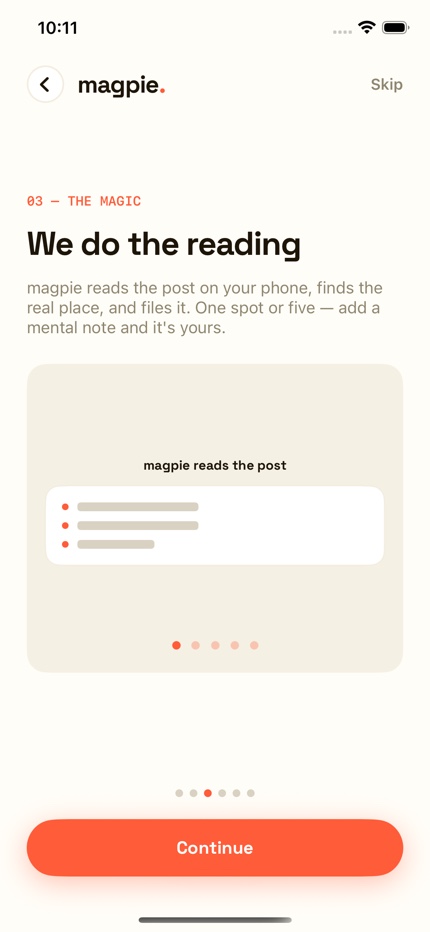
On-device AI reads the caption, and the picture too if the name is in the artwork. It finds the real place and files it. One spot or five from a single “best brunch” post — add a mental note for later you, and it's yours.
Every bit of that happens on your phone — nothing is sent anywhere. On an iPhone with Apple Intelligence you’ll get sharper results again; on any other iPhone it still reads the post, just a little less cleverly.
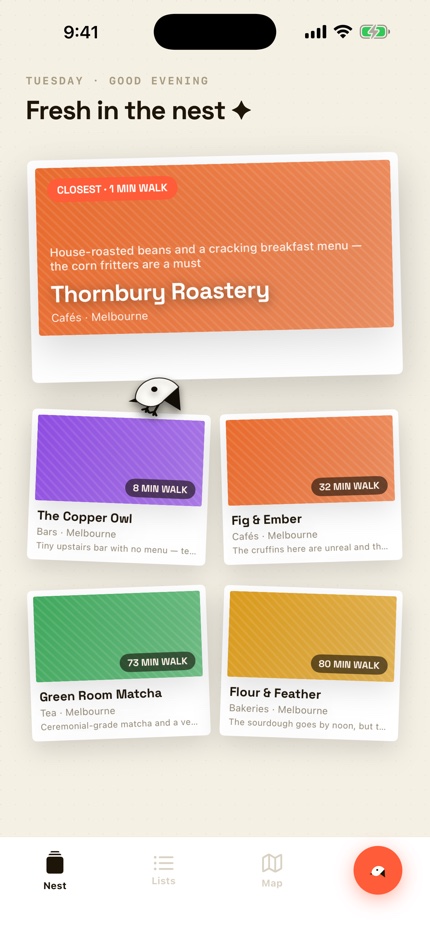
Your last five saves, pinned to one board — closest first, so the one you could walk to right now is the big one. Each keeps a line of what the post actually said, so months later you still know why you saved it. And there's a magpie living on the board, hopping from save to save.
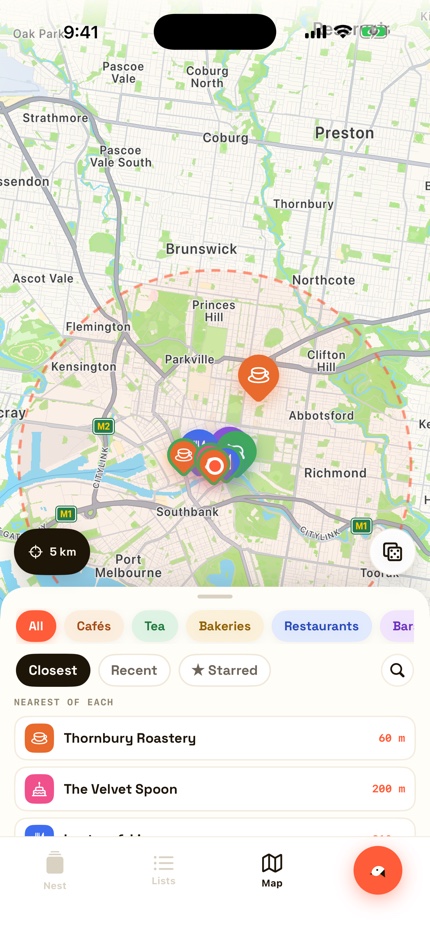
Everything sorts by how close it is right now. The nearest café, the nearest bar, the nearest whatever-you-fancy, one tap away. Still can't decide? Roll the dice and let magpie pick something walkable.
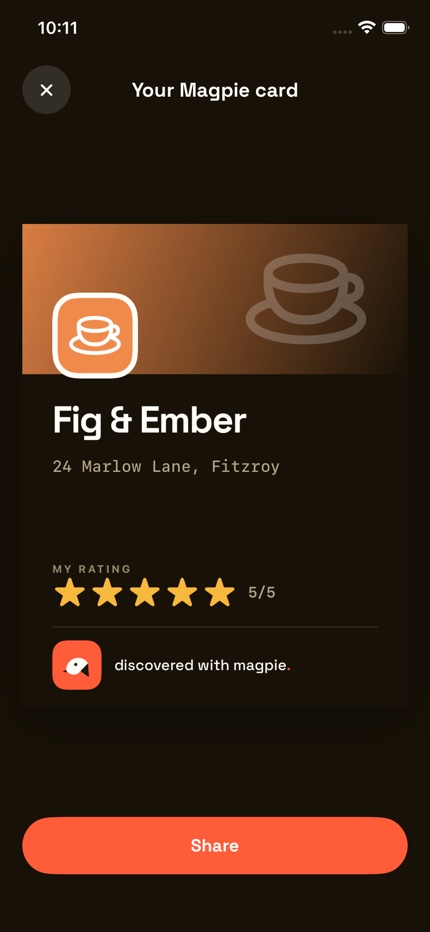
Mark the visit, add your rating, and magpie makes a share-ready place card with the name, address, your stars and the Magpie logo. Messages and WhatsApp can carry its Apple Maps link; on Instagram and TikTok, add the platform's own location tag when you post it.
Saving is the easy part. These are the things that get you out the door.
Share every place you've saved in a city — or a whole country — in one go. Each self-contained link opens in their magpie for them to review and tick; very long lists split across a few links so no place is dropped. No magpie account or storage server needed.
When a caption doesn't name the venue, magpie reads text in the post's cover image. If the name is on another slide, screenshot that slide and share the image — the share extension reads its text on your phone.
Turn on nearby alerts and allow notifications and Always Location. Magpie watches your 20 nearest unvisited saves and nudges you when you come within about 300 metres of one.
When one caption or its venue tags names several spots, magpie presents them together and lets you tick exactly which ones you want to save.
On iOS 18 or later, when Apple Translation supports the language, list rows show a translated name with the original underneath for signs, menus or taxi drivers.
Choose walking distance, a short drive or a long drive — 2, 10 or 30 kilometres. Your near-me lists then show only saved places inside that range.
With iCloud enabled, your places are backed up through your Apple account and restored on a new phone. There is still no magpie account and no magpie server holding your saves.
Magpie’s AI runs entirely on your phone’s own chip. It’s not a privacy setting you toggle — it’s the architecture.
Your posts, places and plans never touch a server. No account to hack, no data to sell, no analytics on your saves.
Your phone does the computing, so there’s no cloud bill to pass on to you. Try for free — buy once — but never rent.
Either way the reading happens on your phone, never on a server. On an iPhone with Apple Intelligence, magpie leans on Apple’s own on-device models — better summaries, and a better read on an awkward caption. Without it magpie reads the post itself: nothing is missing, it’s just a little less clever with the tricky ones.
We built Magpie because our own saved folders were a graveyard of good intentions — hundreds of places we swore we’d visit and could never find again. A magpie doesn’t just hoard its treasure; it knows exactly where every piece is. Now you do too.
made by Folio App Studios
No. Magpie has no accounts and no servers that store your content. Everything — your saves, places, ratings — lives only on your phone. We couldn’t look at it if we wanted to.
Sometimes, yes — and we’d rather say so up front. Posts about food are wildly inconsistent: the name might be in the caption, hidden in a hashtag, painted across the artwork, or nowhere at all except an @handle. Magpie pulls a lot of tricks to work out which real place is meant, and it lands it far more often than not. When it misses, tap wrong place? on the confirm card, type the name, and pick the right one from Apple Maps — it takes seconds. So forgive the bird the odd miss. We’re sharpening its aim constantly.
Any iPhone running iOS 18 or later. Magpie’s AI runs on your phone’s own chip rather than in the cloud, so on an iPhone with Apple Intelligence it writes the sharpest summaries and reads the trickiest captions. On everything else it falls back to reading the post itself — nothing is missing, it’s just a little less clever with an unusual caption.
No, and there never will be for core features. Cloud AI apps charge monthly because they pay for servers. Your phone does Magpie’s computing, so there’s nothing to rent.
Yes — in two ways. We keep improving the app, and because it uses your device’s AI, every phone upgrade and OS-level AI improvement makes Magpie better automatically.
No. Magpie only sees the individual posts you deliberately share to it. It never connects to your accounts, never scrolls your feed, never touches your messages.
The core magic — reading a shared post and pulling the place out — works offline. Looking a place up on the map needs a connection, same as any maps app.
Delete places in the app, or just delete the app — that’s genuinely everything, because nothing was ever stored anywhere else.
We answer every email — usually within a day or two. Tell us your phone model if something’s not working.
last updated August 2026 · the short version is the whole version
Nothing. Magpie has no magpie account and no servers that store your content. The posts you share to Magpie, the places it extracts and the notes you add all live only on your device.
All processing runs on your phone’s own AI hardware. The content you share to Magpie is never uploaded for analysis. Looking a place up on the map uses standard map services, the same way any maps app does.
Magpie opens and works fully without signing in. Sign in with Apple exists only to put your name on a list when you share it — and it can be removed from the app at any time, saves untouched.
Delete a place in the app, or delete the app itself — it’s all gone, because it was only ever on your phone. There’s nothing to request from us; we never had it.
Questions about this policy: administrator@folioappstudios.com — or read the full privacy policy.